Case Study · AI Process Intelligence
AI Operational Inbox
AI-powered process intelligence platform for analyzing operational emails, logistics messages and business-critical workflows — transforming unstructured communication into prioritized, actionable cases.
Platform Snapshot
Input
Emails, messages, operational notes
AI Output
Priority, issue, risk, deadline, action
Interface
Streamlit dashboard
Backend
FastAPI + structured AI analysis
Integration
Webhook-ready architecture
Use Case
Operational AI
Transforms emails and operational messages into structured, actionable workflow cases.
Core Engine
LLM + Rules
Combines AI extraction with deterministic status, routing and escalation logic.
Integration
API-first
Webhook endpoints prepare the platform for email, ERP, logistics and automation tools.
Business Impact
Faster Triage
Helps teams detect urgent issues earlier and reduce manual message sorting.
Business Problem
Operations teams receive high volumes of emails, shipment updates, customer requests and escalation messages. Important cases can get lost because information is unstructured and spread across channels.
AI Challenge
The system must understand messy operational language, extract reliable structured fields and support prioritization without becoming a generic chatbot.
Platform Goal
Create an AI-assisted operational case platform with analysis, status tracking, dashboard visibility and automation-ready integration.
Solution Overview
From inbox chaos to operational intelligence
The platform analyzes inbound operational messages and converts them into structured case records. Each case receives a priority, issue classification, risk assessment, deadline, recommended action and action items. The goal is not a chatbot, but an operational AI layer that helps teams route, prioritize and resolve work faster.
Architecture Flow
Message to action workflow
Email / Message
Webhook / Input
AI Analysis
Structured Case
Priority & Risk
Dashboard
Automation
Raw communication becomes a structured workflow object: messages are ingested, analyzed, prioritized, displayed in the dashboard and prepared for automation or escalation.
Workflow Lifecycle
From message intake to automated response
Capture
Messages are received manually or through webhook-style ingestion.
Analyze
AI extracts priority, risk, issue type, deadline and recommended action.
Organize
Structured cases are stored, filtered and tracked in the operations dashboard.
Automate
High-priority cases can trigger notifications, routing or escalation workflows.
Platform Capabilities
AI-assisted operational case management
Screenshots
Platform interface and implementation evidence
The screenshots show the dashboard, AI case analysis, automation actions, escalation views, analytics and FastAPI documentation.
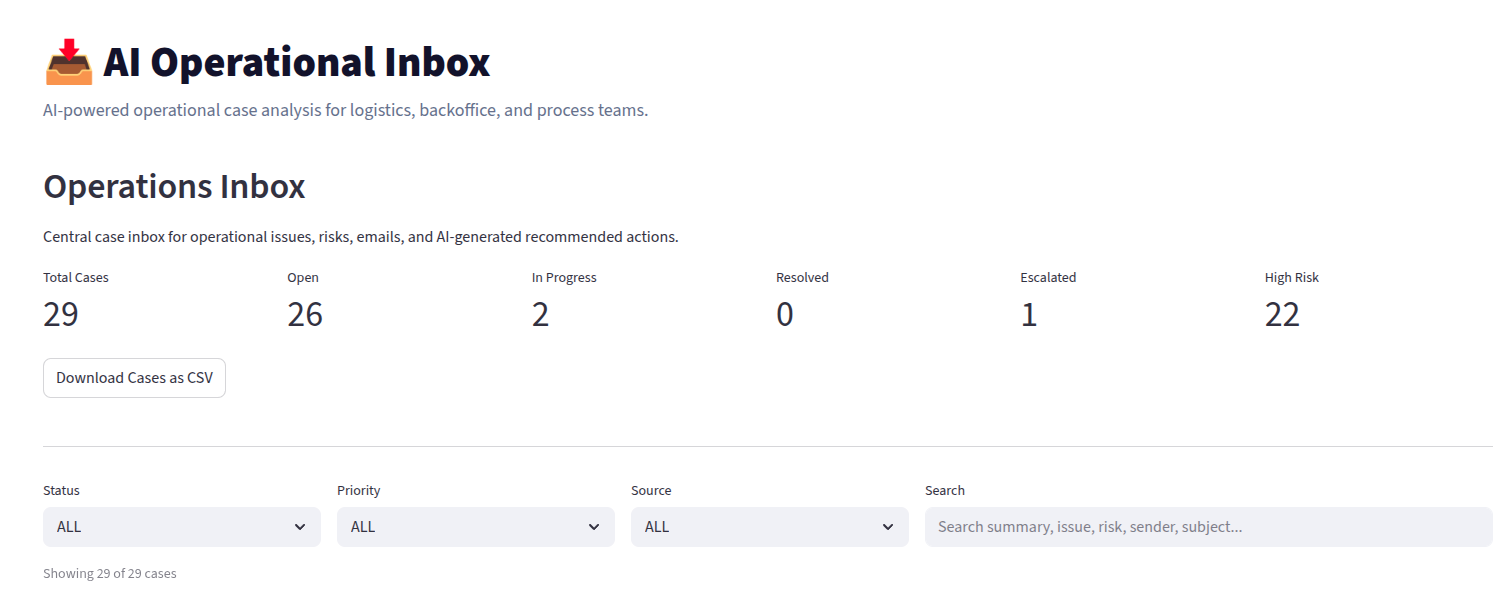
Operations Dashboard
Central operational inbox with KPI overview, filtering, search and live operational case management.
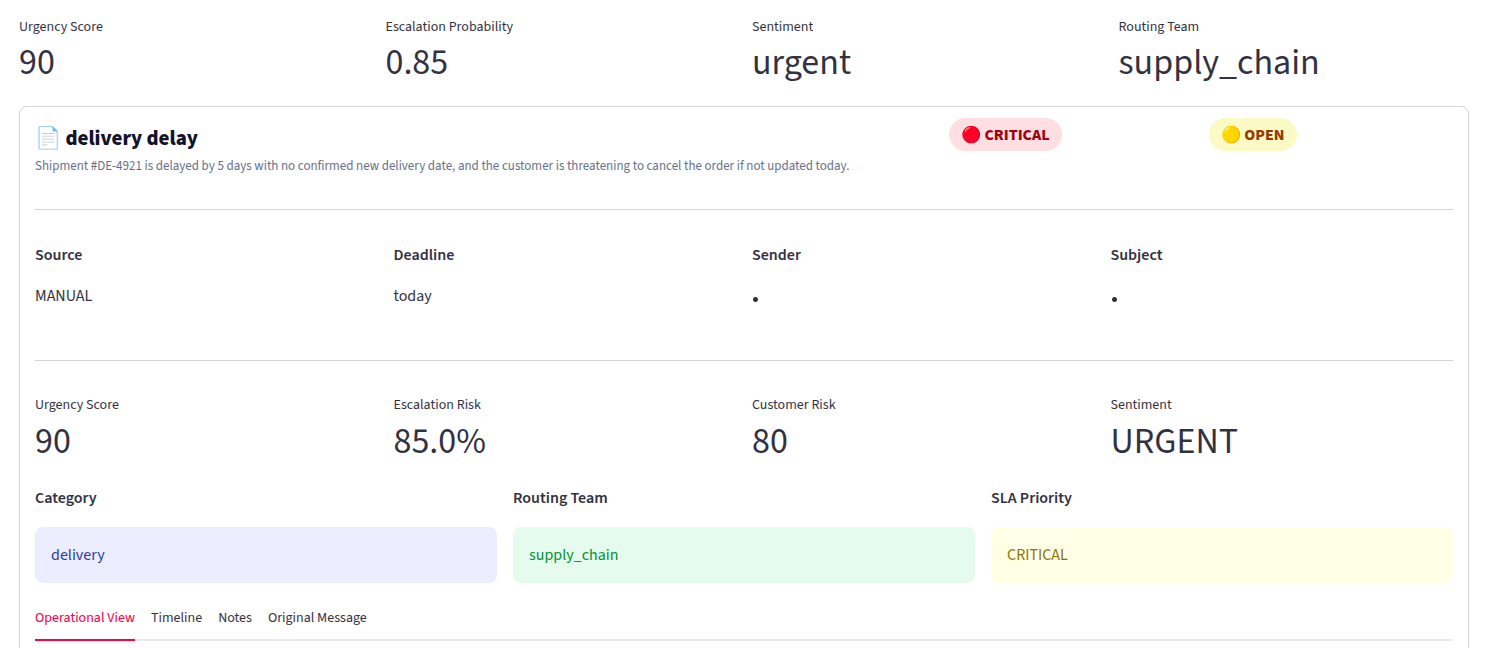
AI Case Analysis
Structured AI-powered case analysis including priority, issue type, risk, deadline and recommended action.
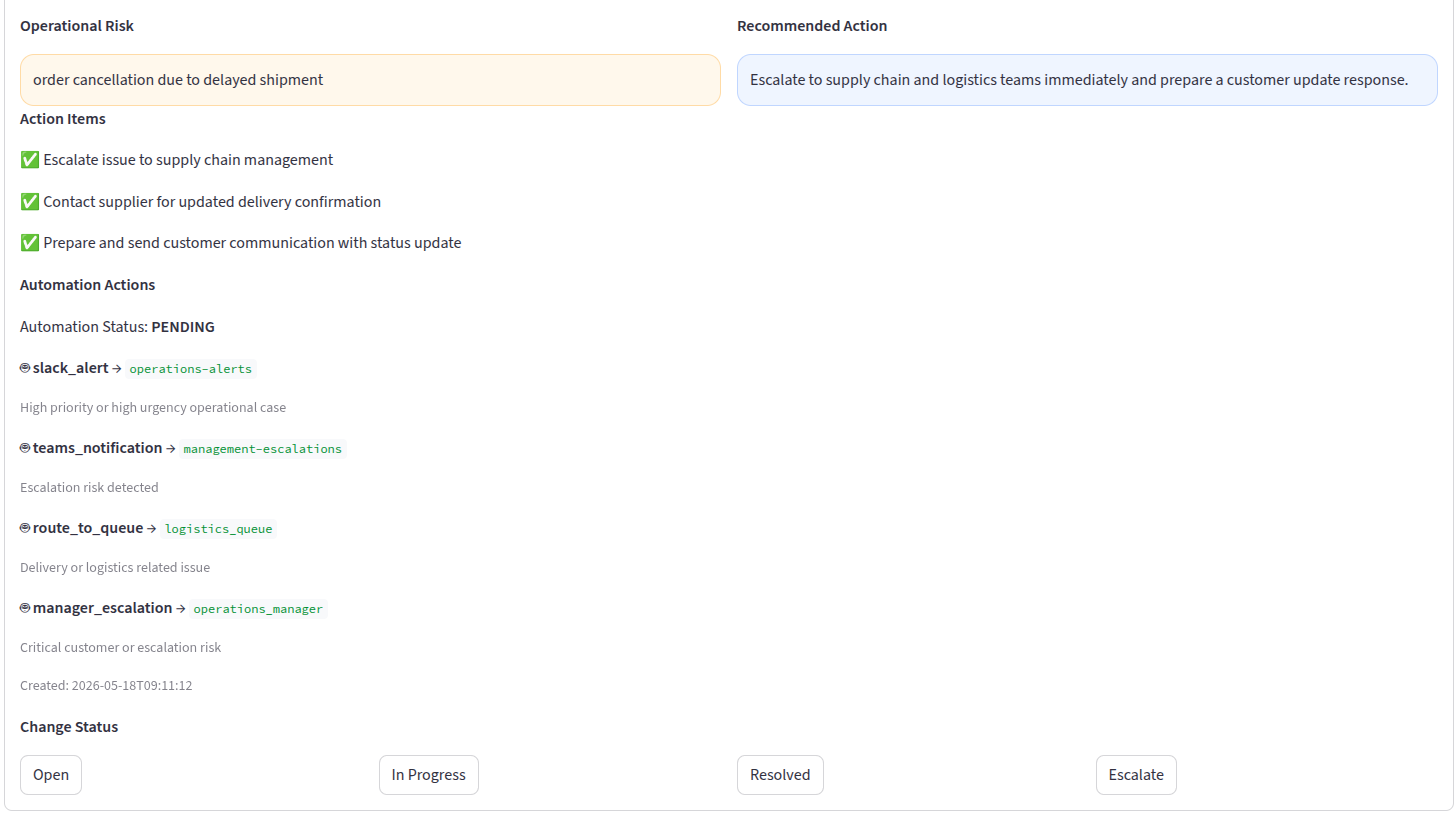
Automation Actions
Workflow automation layer for Slack alerts, escalation handling, queue routing and operational notifications.
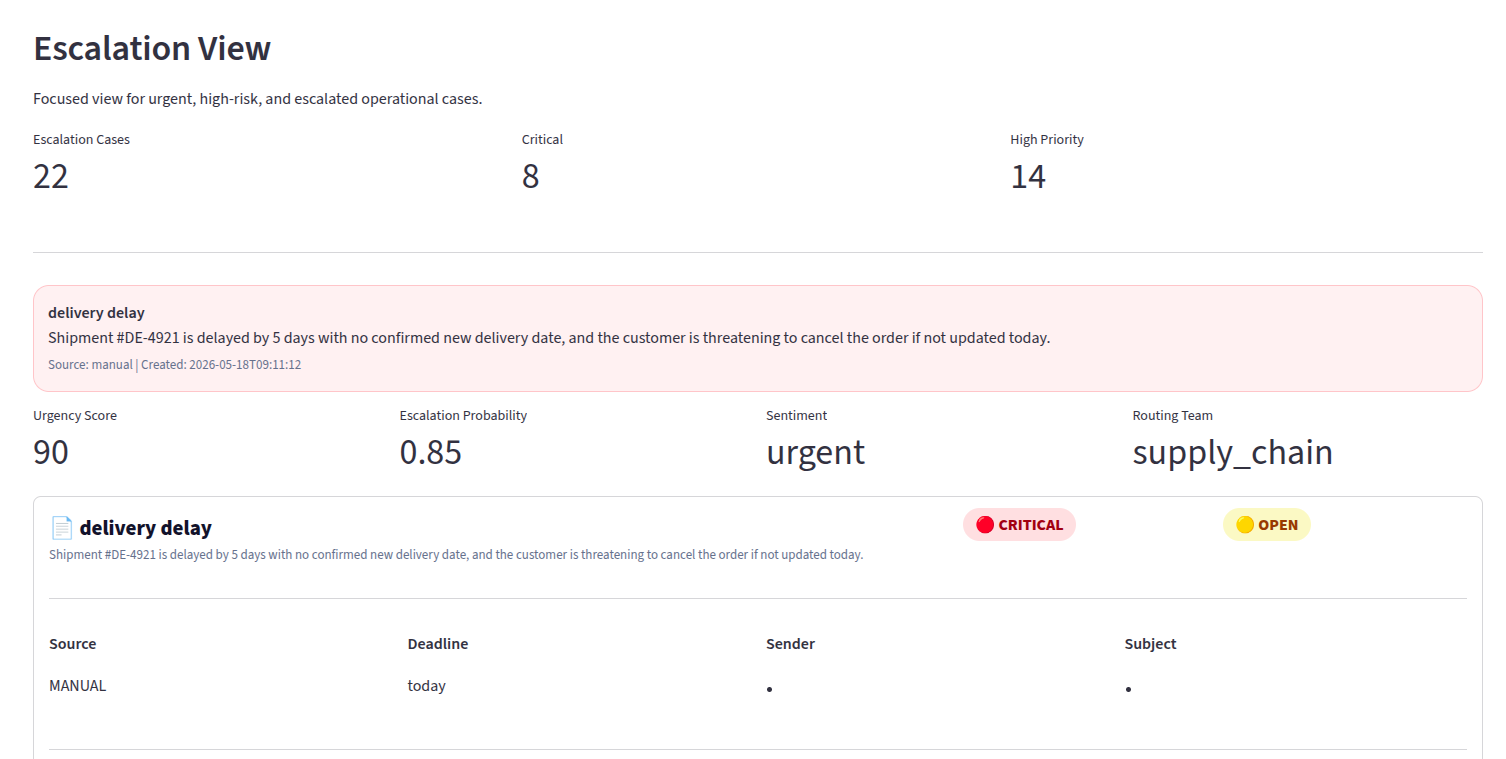
Escalation View
Focused escalation management interface for urgent operational incidents and critical customer risks.
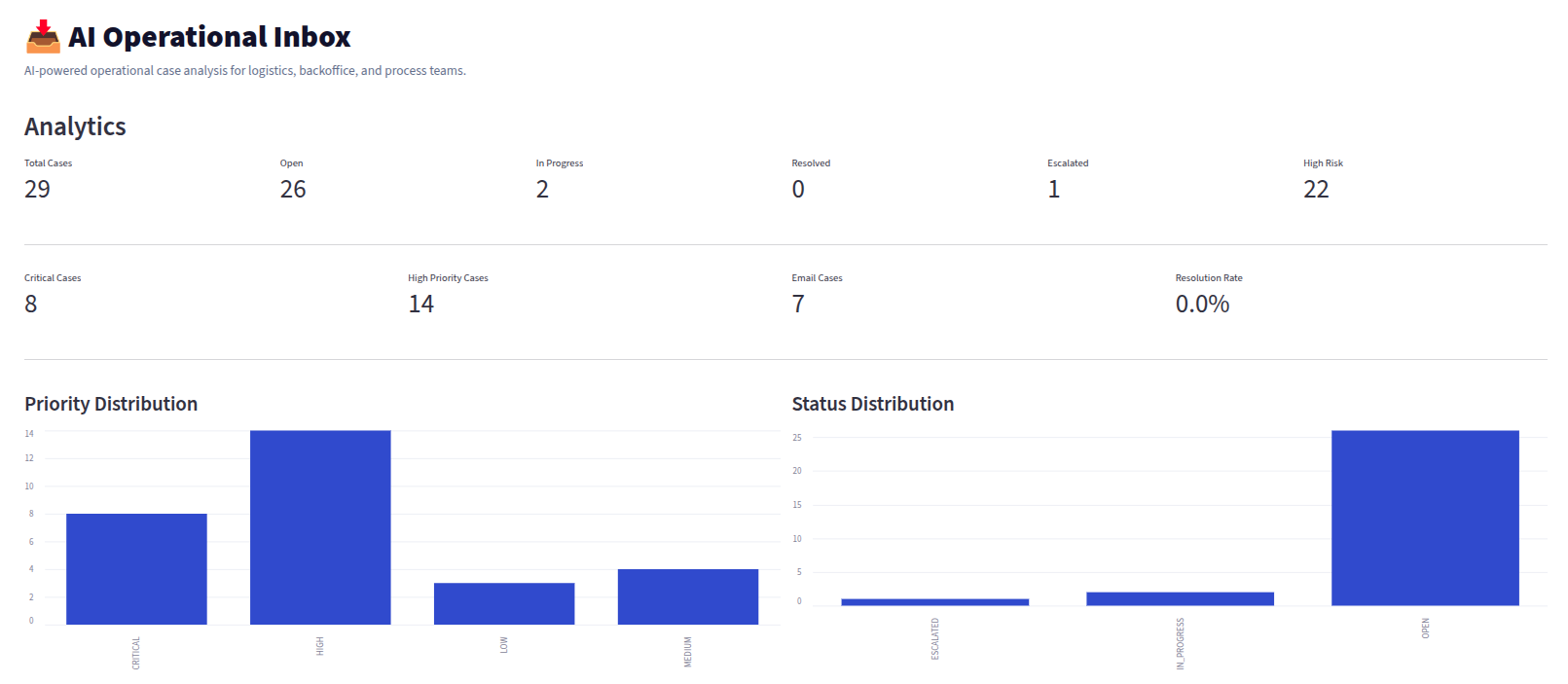
Analytics Dashboard
Operational analytics dashboard with trends, priority distribution, risk monitoring and workflow visibility.
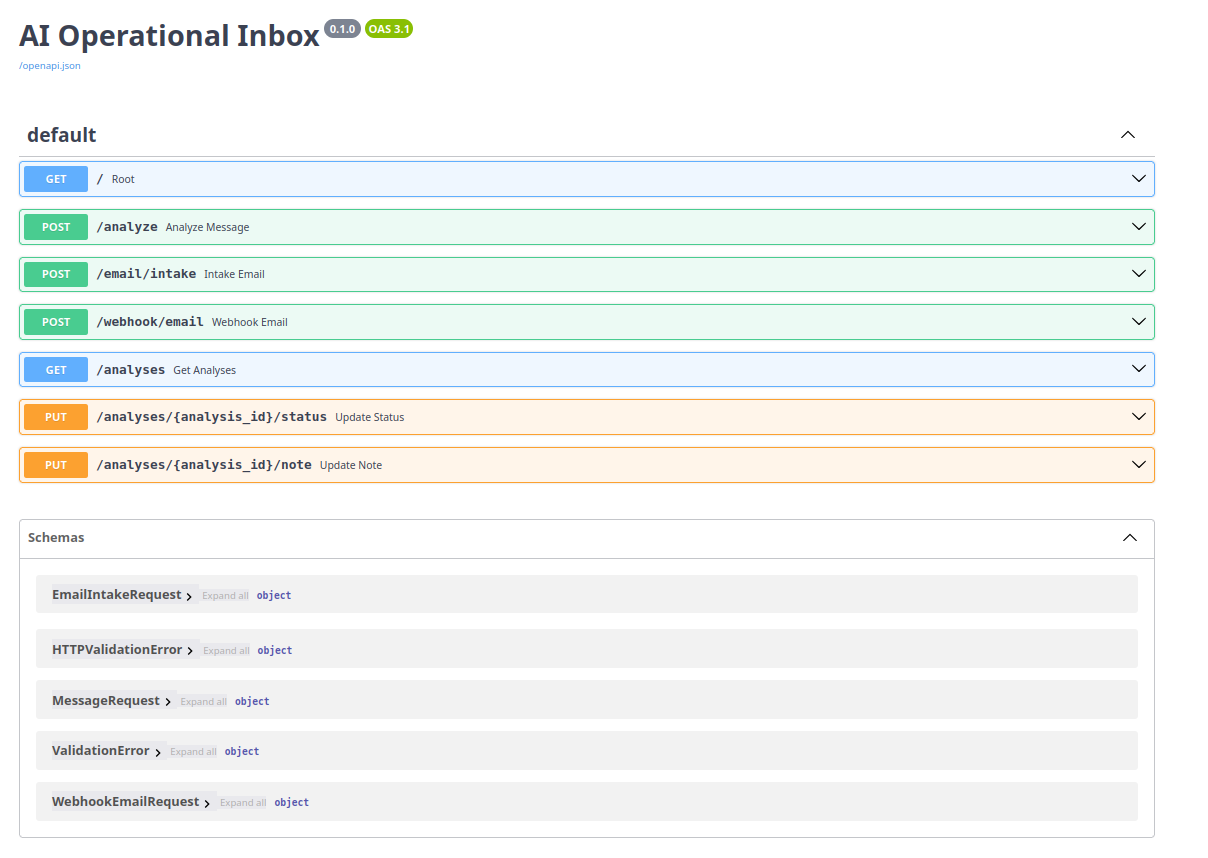
FastAPI Webhook API
FastAPI backend API for operational message ingestion, webhook integrations and structured AI analysis endpoints.
AI Intelligence Layer
Structured extraction instead of chatbot output
The system returns operational fields such as priority, risk, deadline, issue type and recommended action. This makes the output usable for dashboards, workflows and automation.
Integration Layer
Webhook-ready process automation
The backend is prepared for inbound email events and future automation with Slack, Teams, ERP, logistics systems or ticketing platforms.
Selected Code Highlights
Implementation excerpts
Selected short snippets demonstrate the engineering approach without exposing full source files or internal implementation details.
AI analysis endpoint
The backend receives operational text and returns structured case intelligence.
@app.post("/analyze")
async def analyze_message(request: AnalyzeRequest):
    result = ai_service.analyze(request.text)

    case = save_analysis(
        input_text=request.text,
        priority=result["priority"],
        issue=result["issue"],
        risk=result["risk"],
        deadline=result["deadline"],
        recommended_action=result["recommended_action"],
    )

    return case
Structured AI output
The LLM response is constrained into operational fields instead of free-form chat.
{
  "priority": "HIGH",
  "issue": "Delivery delay",
  "summary": "Customer shipment may miss the agreed date.",
  "risk": "Customer escalation and SLA breach",
  "deadline": "Today 16:00",
  "recommended_action": "Notify logistics team and update customer",
  "action_items": ["Check shipment status", "Escalate carrier"]
}
Webhook ingestion
External systems can send inbound operational messages directly into the platform.
@app.post("/webhook/email")
async def email_webhook(payload: EmailPayload):
    analysis = ai_service.analyze(
        subject=payload.subject,
        sender=payload.sender,
        body=payload.body,
    )

    return create_case_from_email(payload, analysis)
Business Value
Why this matters for operations teams
Technologies
Implemented stack
AI Operations · Process Intelligence · Automation
Want to turn operational messages into structured workflows?
MSC Intelligent Systems builds AI systems that analyze unstructured communication, prioritize operational risk and prepare workflows for automation.